InstaSaver – Best Instagram Downloader
Download Instagram Reels with audio, Full HD Videos, Stories, Photos & Profile DP in original 1080p quality for free. Fast, safe & no login required.
InstaSaver app - Solution to download Instagram video and photo
InstaSaver is an online Instagram downloader. Helps you save Videos, Images, Stories, Reels and Avatar from Instagram for free. With just one click, you can download any of your favorite Instagram content in original resolution.
With the website InstaSaver.cc, you can download any post from Instagram in the best quality. InstaSaver supports download Instagram videos, photos, Stories, Insta Reels, IGTV videos, Music and Profile Picture. Simply copy and paste the Instagram link containing the photo or video you want to download into the input box on InstaSaver.cc to start the download process.
InstaSaver's powerful Instagram Downloader
Powerful Instagram Downloader HD developed by InstaSaver is one of the best tools to download Instagram (IG) photo or video. Operated by a high-speed engine, supporting all modern web browsers, and continuously updated to bring the best experience to users.
InstaSaver: Online Instagram Downloader
Outstanding Features of InstaSaver
- Simple, easy-to-use interface: Download photos or videos with just one click without complex steps.
- Supports all devices: Works smoothly on iPhone, iPad, Android, Windows PC, and Mac without needing to install any software.
- Best quality preserved: Videos and photos are downloaded in their original resolution (Full HD 1080p). Quality and size remain authentic.
- Supports MP4 and JPG: High-speed direct streaming and downloading in universal formats compatible with all devices.
- 100% Anonymous & Safe: Does not collect user data or download history. Using InstaSaver is completely private.
- All free: Unlimited downloads with zero subscriptions or hidden fees.
How to download Instagram video and photo simply with InstaSaver?
Step 1: First, open the Instagram app on your device (PC, Android, iPhone, etc.).
Step 2: On Instagram, open the Instagram post (Video, Reel, or Photo) and copy the link.
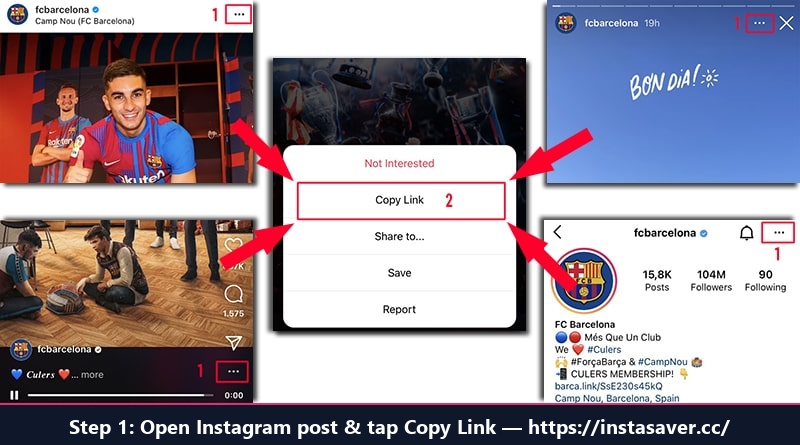
Step 2: Open Instagram post, tap Share and select "Copy Link"
Step 3: Go to website InstaSaver.cc, paste the Instagram post link into the input field (at the top of the page) and press the Download button.
Step 4: Wait a few seconds for the InstaSaver tool to extract the video or photo from Instagram and click Download HD to save it directly to your phone or computer.
Supported Instagram Content Types
InstaSaver is an all-in-one suite supporting every Instagram media type:
Instagram Reels Download
Save short viral Instagram Reels with audio in crisp 1080p MP4. Watch offline anytime.
Instagram Video Download
Download standard feed videos and long clips in original high bitrate without compression.
Download Instagram Stories
Save 24-hour expiring Stories and Highlights anonymously without the poster knowing.
Instagram Photo Download
Download single photos or complete multi-photo carousel albums in original dimensions.
Download Instagram Profile Picture
View and download anyone's profile avatar in full HD 1080p by pasting username or profile link.
Download Instagram Audio
Extract isolated MP3 background music or voice audio tracks directly from Reels and videos.
FAQ
Common questions about using InstaSaver
What is Instagram Downloader?
Instagram Downloader is an amazing tool developed by InstaSaver. This tool allows you to save and download Instagram photos, videos, Stories, IG Reels, IGTV, audio and profile pictures easily and effectively.
How to download Instagram videos in HD quality?
Step 1: Copy and paste the Instagram link you want to download into the input box on InstaSaver.cc and press the Download button.
Step 2: Wait for our server to process and display the download link. Now you can download videos to your device with the highest quality.
Can I use InstaSaver to download Instagram videos to iPhone?
Sure. To download videos or photos from Instagram to your iPhone or iPad, you can use the Safari browser on iOS 13 or higher. Simply visit InstaSaver.cc, paste your link, tap Download, then tap the Share icon and select "Save Video" to save directly to your Camera Roll.
How to save Instagram photos and videos to Android?
Very simple. Simply copy the Instagram link and paste it into the input box on InstaSaver.cc and hit the Download button. The file will be saved directly into your device's Downloads folder and Gallery.
Does InstaSaver require software installation?
No. InstaSaver is a 100% browser-based tool. We don't ask you to install any software, app, or browser extensions.
Do I have to log in to my Instagram account?
No. We never ask you to log in to your Instagram account or provide personal credentials (account, password, email, or phone number). Your personal data remains 100% secure.
Is using InstaSaver to download Instagram videos and photos free?
All free. You can use InstaSaver to download Instagram content in the best quality without worrying about any costs.